
Oops! This Theme didn't make the cut and is no longer available. Check our homepage for the latest ThemeGrade of your favorite WP Themes.
Designer: Press75 - Provider Review
Theme version: 1.0
List all 26 themes developed by Press75
SevenFive Theme review
Setting It Up
The Setting up of the SevenFive theme is quite simple enough and is done in quite the same way as any other WordPress Theme. All you have to do is download the sevenfive.zip file and extract it to the /sevenfive/ folder. Next, simply upload the folder to the /wp-content/themes directory of an ftp client (like Filezilla). All that remains to be done now is to activate the theme through your WordPress admin panel under the Appearance or Presentation Tab.
Features
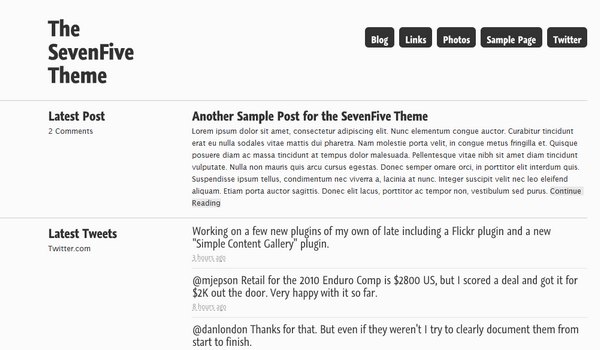
The visuals of the Seven Five theme are quite bare. The theme just consists of a white background, and the homepage has vertically arranged sections for the Latest Post, Latest Tweets, Latest Pictures, and Latest Links and last but not the least the Contents Section, which basically consists of posts with an excerpt of that post being visible. The font used for the theme is the Lucida Sans font, which in spite of its simplicity, adds a certain charm to the theme. It has links to the Blog, Twitter, Photos and Links in the form of Tabs on the upper right corner of the homepage.
There is a particular reason as to why this theme is so bare. The creators of this theme wanted to make the theme as minimalistic as possible. The theme is classified as a “Lifestream”, which means that it is a time-ordered stream of entries and documents that works like a diary of our electronic life. So every entry or document that the blogger uploads and every document that his followers send is stored in the lifestream, that is the blog. This blog can thus also be considered as a social activity stream.
The SevenFive theme does not support any external plugins, but it does come with built in plugins for Twitter and Flickr. It does have a few important plugins like the RSS feed generator missing, which the theme creator plans on releasing in the updates for the theme, that are to come.
The Seven Five theme is compatible with the versions 2.8 and 2.9 of WordPress, if it is installed properly. The best thing about the Seven Five theme is that it is extremely simple to use. Anyone who knows how to handle WordPress will have no problems in using the Seven Five theme as well. But just in case someone does need a bit of help, they can find it at Press75.com’s Support Forums, or they can directly access the SevenFive theme’s Installation instruction by following the given link:
http://www.press75.com/v4/documentation-support/seven-five-setup-usage/
A few more important details that have to be considered are the requirements to use the SevenFive theme. It requires version 2.8 or above of WordPress to be available on your ftp server. Other requirements include version 5 or above of MySQL and version 5 or above of PHP with GD Support enabled on your hosting environment. If someone is not sure whether their web hosting environment is compatible with the Seven Five theme, then they can download a free plugin to check if their hosting environment can handle it, the link to which is available on the Documentation and Support Page.
Theme Score
| General | SEO | Overall |
|---|---|---|
| 67% | 58% | 64% |
Theme testing in such detail is a tedious process. We try our very best to present the most accurate information about the theme. We need your help: if you find a discrepancy in any of the items we tested above, please leave a comment below and tell us what is wrong. We'll look into it and make correction if it is our mistake. If you are a user of this theme, feel free to leave a comment and share with us your experience with the theme. Notice: Some of the links on ThemeGrade are affiliate links which means we may receive a commission if you click a link from here and ultimately purchase the product. These commissions allow us to keep ThemGrade free.