
Oops! This Theme didn't make the cut and is no longer available. Check our homepage for the latest ThemeGrade of your favorite WP Themes.
Designer:
Theme version: 1.0
List all 4 themes developed by
Memory Book Theme Review
Setting It Up
The Setting up of the Memory Book theme is quite simple enough and is done in quite the same way as any other WordPress Theme. All that one has to do is download the memory-book.zip file and extract it to the /memory-book/ folder. Next, the folder has to be simply uploaded to the /wp-content/themes directory of an ftp client (say like Filezilla). All that remains to be done now is to activate the theme through the WordPress admin panel under the Appearance or Presentation Tab.
Features
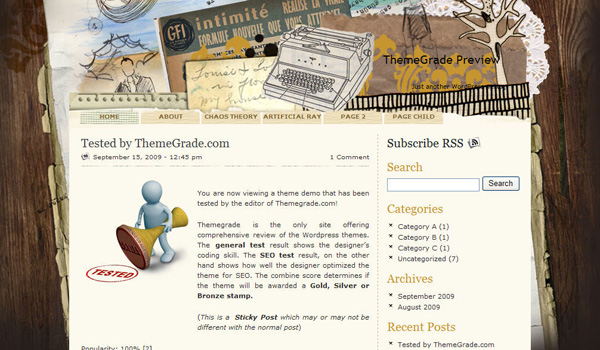
The Memory Book is a free theme which can be used for personal blogs. The visuals of the Memory Book theme are simple enough. It just consists of four basic colors, namely white, orange, brown and gray. The background image is nothing very spectacular, let us face it; we have seen themes which have some awesome backgrounds. Moving on, the theme basically consist of two columns, the column on the right is a sidebar containing the RSS feed subscription link, the search bar, the Categories Section, the Archives section and the Recent Posts Section. The theme has links to its Pages incorporated in the header section of the theme. The topmost post in any page is a sticky post. The posts in the pages have the usual classifications, like there are posts with an image in them, posts where an excerpt is shown and also posts which have links and 3 pages within it.
There are a few major drawbacks of this theme though. The components of the theme are not quite well arranged. The quality of the code used by the designer in the design process of this theme is not quite up to the mark. A few very obvious discrepancies that can be seen are the RSS feed link creeping over the tab of a page. The date of the sticky post is overlapping on the current page name. All these defects have a negative effect on the person following the blog. There is no Help and Support section provided by the Designer for the users of this theme, so if they face any problems, they will have to work it out on their own. The Post Area is improperly aligned, with the area for images also being improperly aligned. The Memory Book theme also does not support nesting of comments, thus making it difficult for the blogger to keep track of who is replying to whom in the comments. There is also no feature for auto adjustment of the Side Bar. It might seem like a trivial issue, but it does complicate matters once an image or quite a lot of text is to be put in a section. In that case, the side bar may overlap with the text or image area, thus causing huge problems for the followers of the blog.
Theme Score
| General | SEO | Overall |
|---|---|---|
| 69% | 72% | 71% |
Theme testing in such detail is a tedious process. We try our very best to present the most accurate information about the theme. We need your help: if you find a discrepancy in any of the items we tested above, please leave a comment below and tell us what is wrong. We'll look into it and make correction if it is our mistake. If you are a user of this theme, feel free to leave a comment and share with us your experience with the theme. Notice: Some of the links on ThemeGrade are affiliate links which means we may receive a commission if you click a link from here and ultimately purchase the product. These commissions allow us to keep ThemGrade free.